

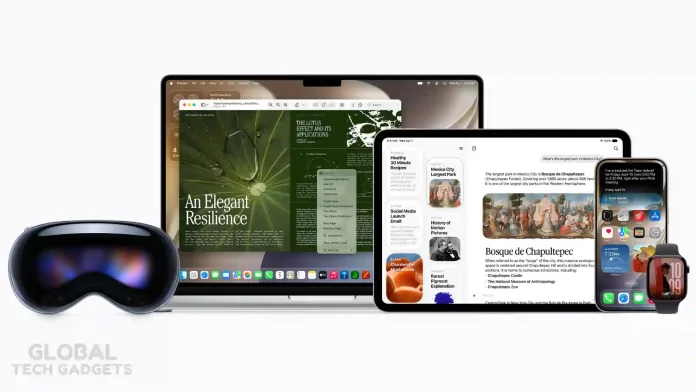
If you’ve ever felt limited by Siri’s rigid responses or wished it could actually understand the full picture of what you’re doing, the iOS 27 update delivers exactly that upgrade. Apple has rebuilt Siri from the ground up with Apple Intelligence, creating what it officially calls Siri AI — a dramatically more capable, conversational, and context-aware assistant.
This isn’t a minor tweak. It’s a complete architectural overhaul that brings personal context, onscreen awareness, broad world knowledge, and seamless app actions directly into your daily iPhone experience.
Apple Intelligence vs. Previous Siri: The Real Difference
The old Siri excelled at simple commands like setting timers, sending basic texts, or checking the weather. It often required precise phrasing and struggled with follow-up questions or pulling information from across your apps.
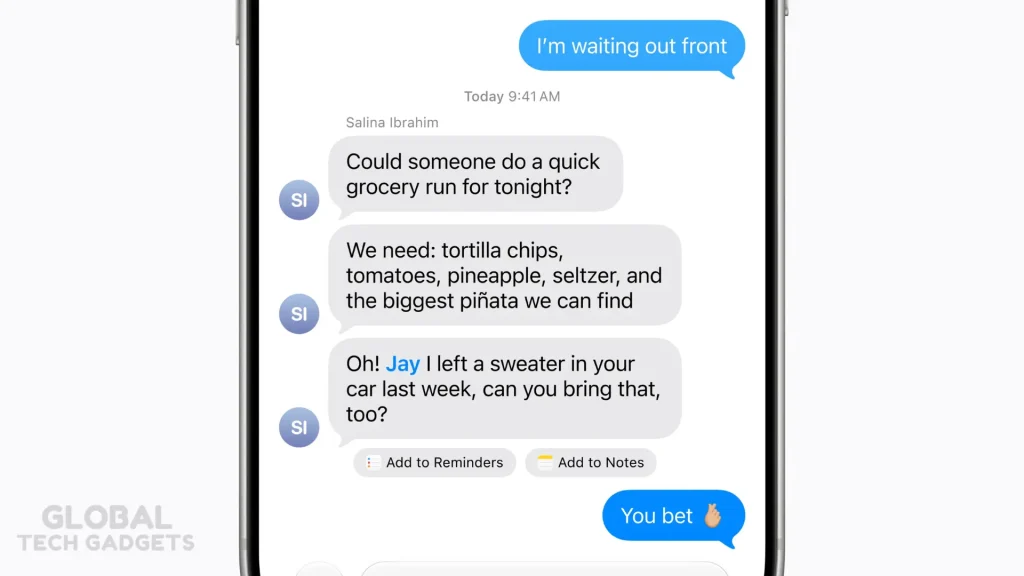
Siri AI, powered by Apple Intelligence, changes the game. It understands natural conversation, reasons through requests, accesses your personal data securely, analyzes what’s on your screen, and takes real actions across apps — all while keeping privacy at the core.
Craig Federighi, Apple’s senior vice president of Software Engineering, described it as “a dramatically more capable and conversational assistant designed to help users find information and get things done throughout the day.”
The shift moves Siri from a voice command tool to an intelligent companion that works with your data the way you actually use your devices.
Key New Features in Siri AI for iOS 27
Personal Context Understanding
Siri AI now searches across your Messages, Mail, Photos, Notes, and other apps to find relevant information without you spelling everything out.
Examples:
- “What was that restaurant my sister recommended last week?”
- “Show me the hotel confirmation from my email.”
- “Find photos from the music festival last weekend.”
It pulls the right details from your personal history and presents them naturally.
Onscreen Awareness

Ask questions about whatever is currently visible on your screen. No need to describe it.
Example: You’re in a group text planning a potluck. Ask Siri to brainstorm ideas based on the conversation and it can suggest recipes, then add one directly to Notes.
This works across apps and feels like having a smart assistant looking over your shoulder — but privately.
Broad World Knowledge
Siri AI pulls fresh information from the web for up-to-date answers on almost any topic.
Need the date of the next solar eclipse? Tour dates for your favorite artist? Recipe ideas for a dinner party? It handles open-ended questions with helpful, contextual responses and can follow up naturally.
App Actions and System Integration
Siri can now perform multi-step tasks across apps.
Examples:
- “Write a quick response to this email and send it.”
- “Send all the photos from today to Eric.”
- “Add a 3pm meeting with Sarah to my calendar.”
It uses a system orchestrator and app toolbox to identify and execute actions intelligently.
Dedicated Siri App + Cross-Device Continuity
A new dedicated Siri app lets you review, pin, and continue conversations. Your chat history syncs privately across iPhone, iPad, Mac, Apple Watch, and Apple Vision Pro via iCloud.
Start a conversation on your Mac and pick it up seamlessly on your iPhone.
Writing Tools and Voice Improvements
Integrated Writing Tools let you generate drafts, refine text to match your style, get proofreading, and receive suggestions — all system-wide, including in third-party apps.
Voice gets more expressive and customizable (on supported newer devices), with significantly improved dictation that handles punctuation, capitalization, and formatting automatically.
Expanded Visual Intelligence

On iPhone, a new Siri mode in the Camera app lets you ask about what you’re pointing at — nutritional info on food, split a bill via Apple Cash, or identify objects. Similar capabilities extend to screenshots on iPad, screen selections on Mac, and spatial awareness on Vision Pro.
Privacy Remains Apple’s Top Priority
Siri AI uses a bold new architecture with next-generation Apple Foundation Models. Processing happens on-device whenever possible. For more complex tasks, it uses Private Cloud Compute — servers Apple designed so your data isn’t stored or accessible to Apple (or anyone else). Independent experts can verify the privacy claims.
This stands in contrast to many other AI assistants that send your data to the cloud for training or storage. Your personal information stays yours.
Compatible Devices for Siri AI and Apple Intelligence
Full Siri AI and Apple Intelligence features require:
- iPhone 15 Pro / Pro Max or later (including all iPhone 16 and iPhone 17 models)
- iPad mini (A17 Pro)
- iPad models with M1 chip or later
- Mac models with M1 chip or later
- Apple Vision Pro
- Apple Watch Series 9 or later, Ultra 2, or SE 3 (paired with a compatible iPhone)
The most advanced on-device features (highly expressive voices and top-tier dictation) require even newer hardware like iPhone 17 Pro models, iPhone Air, M3/M4+ Macs with sufficient memory, etc.
iOS 27 itself supports a broader range of devices (iPhone 11 and later), but the intelligent Siri features are limited to the hardware above.
Release Timeline
- Developer beta: Available now (since June 8, 2026)
- Public beta: Expected July 2026
- Full release: Fall 2026 (typically mid-September) with iOS 27
Siri AI starts in English and will expand to more languages quickly. Availability is rolling out across iOS 27, iPadOS 27, macOS 27, and visionOS 27 (watchOS 27 coming in a future beta).
Note: Initial rollout has some regional limitations (not available in the EU for iOS/iPadOS/watchOS initially, and not in China).
How This Changes Daily Life on Your iPhone
Imagine planning a trip: Siri can pull hotel details from your email, suggest restaurants based on past messages, check tour dates online, add events to your calendar, and even help draft messages to friends — all in one flowing conversation.
Or handling daily tasks: While looking at a photo or document, ask Siri to summarize it, translate text, or take action. The combination of personal context + onscreen awareness + app actions removes friction that used to require multiple steps or apps.
It feels less like talking to a robot and more like having a knowledgeable assistant who knows your life and can act on it.
Other Apple Intelligence Highlights Coming in iOS 27
Beyond Siri, you’ll see enhancements in Photos (better Clean Up, Extend, Spatial Reframing), Writing Tools everywhere, smarter suggestions in Mail and Messages, improved Shortcuts via natural language, Call Context in the Phone app, and more.
Performance improvements across the OS (faster app launches, quicker photo loading, better AirDrop) make the whole experience snappier.
Final Thoughts
The iOS 27 Siri AI overhaul represents Apple’s biggest step yet in making AI genuinely useful and private on consumer devices. By combining deep personal context, onscreen understanding, and powerful app integration, Siri AI moves far beyond its previous limitations.
If you have a compatible iPhone (15 Pro or newer), this fall’s update is worth the wait — or the public beta if you like testing early. The difference in how you interact with your iPhone will be noticeable from the first time you try a natural, multi-part request.
Ready to experience the new Siri? Keep an eye on the public beta program starting next month.
What is the difference between Apple Intelligence and Siri AI?
Apple Intelligence is the foundational AI architecture powering all the smart system-wide features across your device. Siri AI is the upgraded, conversational digital assistant that uses this framework to interact seamlessly with you. In short, Apple Intelligence acts as the underlying brain, while Siri AI serves as the voice and interface.
Does Siri AI in iOS 27 have on-screen awareness?
Yes, the iOS 27 update introduces full on-screen awareness, allowing Siri to “see” and understand active display content. You can ask Siri to take action on whatever you are currently viewing without needing to take screenshots or copy text. For instance, if a friend texts you an address, you can simply tell Siri to save it directly to their contact card.
How does personal context work with the new Siri AI?
Siri AI can now access and cross-reference data securely across your apps, including emails, messages, and photos. If you ask for a flight confirmation or a hotel booking, Siri will search your device history to instantly surface the exact details. This process is completely private, utilizing on-device processing and Apple’s secure Private Cloud Compute architecture.
Can Siri AI write or summarize text for me?
With the new system-wide Writing Tools, Siri AI can instantly generate, proofread, and summarize text in virtually any app. You can ask Siri to rewrite an email to sound more professional or to condense a long document into key bullet points. It can even mirror your usual texting style, adapting its tone and punctuation to match how you speak to specific contacts.
Does Apple Intelligence use Google Gemini for Siri?
Apple developed its own Foundation Models for Siri AI, but they were trained and refined using outputs from Google Gemini. Siri primarily relies on Apple’s proprietary architecture to handle your personal context and on-device actions securely. However, for complex questions requiring broad world knowledge, Siri can seamlessly tap into third-party integrations when needed.
Are Apple Intelligence and Siri AI free to use?
Both Apple Intelligence and the completely rebuilt Siri AI are entirely free as part of the iOS 27 update. There are no hidden subscription fees, provided you are using a compatible iPhone, iPad, or Mac device. The only potential costs would arise if you manually choose to connect an external, premium third-party account like ChatGPT.


